
TikFinity alternative
A simpler, lower-cost web-first option for live creators
Choose TTLiveConnect for focused overlays, sound rules, device text to speech, and Southeast Asian languages. Choose TikFinity when advanced automation and wider integrations matter more.
The TTLiveConnect Free plan requires no card. The Pro trial starts separately through the payment page.
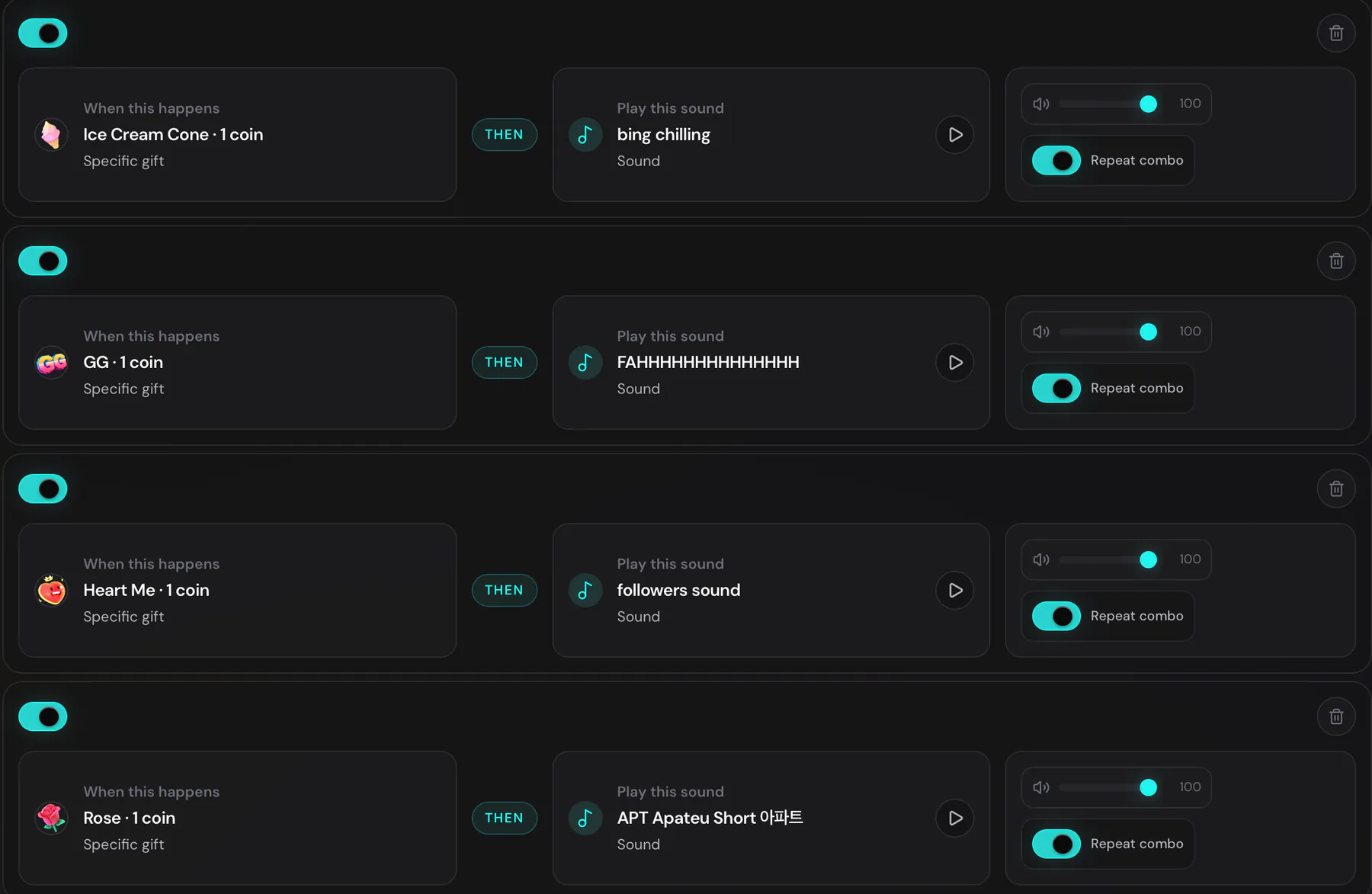
Configure reactions in one web dashboard
Create an IF/THEN rule, pick a sound, test it, and copy your browser-source links into OBS or TikTok Live Studio.
Compare the same billing cadence
Monthly is compared with monthly, and annual with annual. No mixed-cadence headline math.
TTLiveConnect is about $41 less each year.
USD list-price snapshot verified 20 August 2026. Prices can change independently; official TikFinity feature sources are linked below.
TikFinity and TTLiveConnect, feature by feature
Free allowance
- TikFinity
- 5 Actions & Events, 5 sound alerts, and 100 TTS snippets per day
- TTLiveConnect
- 4 creator overlays, 10 active sound-alert rules, and device/browser TTS
Sound alerts
- TikFinity
- 5 on Free; unlimited alerts and uploads on Pro
- TTLiveConnect
- 10 active rules on Free; unlimited rules and MP3 uploads up to 5 MB / 30 seconds on Pro
Text to speech
- TikFinity
- 100 snippets daily on Free; unlimited snippets and AI voices on Pro
- TTLiveConnect
- Device/browser voices on Free and Pro, with no TTLiveConnect daily quota; no AI voice catalog
Creator overlays
- TikFinity
- Interactive, gift, goal, counter, and premium overlays
- TTLiveConnect
- Top Gifters, Top Likers, Gift Menu, Timer on Free; Gift Cup on Pro
Custom sound uploads
- TikFinity
- Available on Pro
- TTLiveConnect
- MP3 uploads up to 5 MB / 30 seconds on Pro
Interface languages
- TikFinity
- English, German, and Spanish
- TTLiveConnect
- English, Malay, Vietnamese, and Thai
Automation depth
- TikFinity
- Broader Actions & Events, chatbot, API, desktop tools, games, and integrations
- TTLiveConnect
- Focused IF/THEN sound rules and creator browser-source overlays
Broadcast software
- TikFinity
- OBS and TikTok Live Studio
- TTLiveConnect
- OBS and TikTok Live Studio
Comparison verified 20 August 2026. TikFinity facts are limited to its current official product pages and supplied Pro pricing screen.
Start with the Free plan—no card required—then decide whether the simpler setup fits your live routine.
Pick the tool that matches your workflow
TTLiveConnect is a strong fit when…
You want a lower-cost, web-first control room for the live essentials.
- You prefer browser-based setup and browser-source overlays
- Four free overlays and 10 free active sound rules cover your setup
- Device voices without a TTLiveConnect daily TTS quota are enough
- English, Malay, Vietnamese, or Thai UI matters
TikFinity is a strong fit when…
You need deeper automation, AI voice choices, or a broader integration ecosystem.
- Advanced Actions & Events and chatbot automation matter
- You want an AI voice catalog for TTS
- Goals, counters, and a wider premium-overlay range matter
- Spotify requests, API, desktop, game, or wider integrations matter
Switch safely, side by side
- 01
Configure TTLiveConnect
Connect your stream handle and set up the overlays and sound rules you actually need.
- 02
Add sources alongside
Add TTLiveConnect browser sources to your existing OBS or TikTok Live Studio scene without removing TikFinity yet.
- 03
Test real events
Use the built-in tests and a private or low-risk live session to verify sound, visuals, and source sizing.
- 04
Disable old sources
Only hide or remove the old TikFinity sources after TTLiveConnect behaves correctly in your production scene.
How this snapshot was verified
FAQ
Questions about choosing or switching
Is there a free TikFinity alternative?
Yes. TTLiveConnect Free includes Top Gifters, Top Likers, Gift Menu, Timer, 10 active sound-alert rules, and device/browser text to speech. The Free plan requires no card.
What does TTLiveConnect cost compared with TikFinity?
Monthly Pro is $14.99 for TTLiveConnect versus $19 for TikFinity. Annual Pro is $129.99 versus $171. This cadence-matched snapshot was verified on 20 August 2026.
What can I use without paying?
TTLiveConnect Free includes 4 creator overlays, 10 active sound-alert rules, 4 theme presets plus a custom accent, device/browser TTS without a TTLiveConnect daily quota, and the latest livestream recap.
Does TTLiveConnect work with OBS and TikTok Live Studio?
Yes. Copy the TTLiveConnect browser-source URL into OBS or TikTok Live Studio, then test it in your scene before going live.
Does TTLiveConnect support multiple languages?
Yes—English, Malay, Vietnamese, and Thai. TikFinity currently lists English, German, and Spanish.
How should I switch from TikFinity?
Configure TTLiveConnect first, add its sources alongside TikFinity, test real events, and disable the old sources only after the new setup is verified.
What changes on TTLiveConnect Pro?
Pro adds Gift Cup, unlimited active sound-alert rules, custom MP3 uploads up to 5 MB and 30 seconds, and watermark removal.
Do free overlays include a watermark?
Yes. Free browser-source overlays carry a small ttliveconnect.com mark. Pro removes it.
Creator resources
Explore creator resources
Choose a product guide to plan your stream setup and understand how each tool works.
Build the setup before you pay
Start on the Free plan with no card. If you later need Gift Cup, unlimited sound rules, custom MP3 uploads, or clean overlays, Pro is available from the payment page.